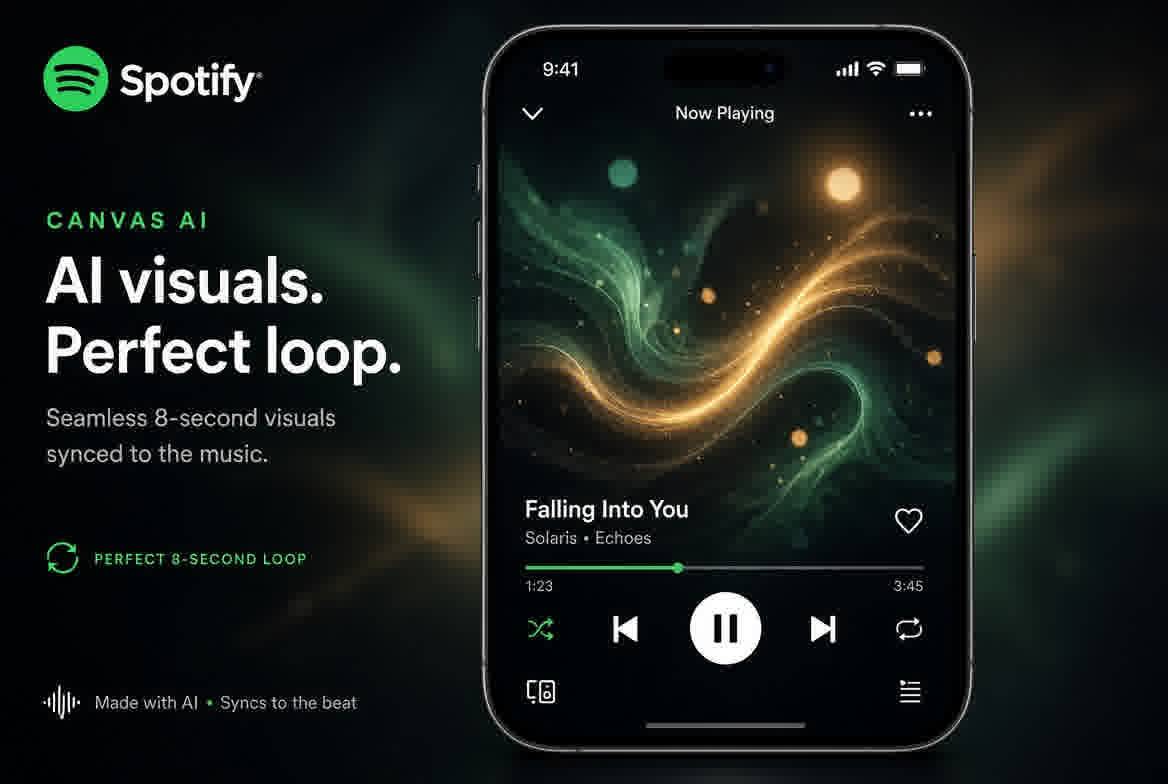
Open Spotify. Play a track. Look at the Now Playing screen. If the artist has a Canvas, you see a short looping video behind the album art instead of a static image. If they do not, you see a still cover. That is the difference between a track that feels alive and one that feels like a JPEG from 2015.
Spotify's own data shows that tracks with Canvases see up to 20% more shares, 9% higher streams, and 5% higher playlist adds. Yet despite these numbers, a significant percentage of tracks on Spotify still have no Canvas — because traditional production costs $50-$200 per loop and requires professional motion design skills.
An AI Spotify Canvas generator changes this completely. It creates a perfect 8-second MP4 loop from your audio file — no design skills, no After Effects, no per-Canvas cost — in under a minute. This article covers everything you need to know to Canvas your entire catalog.
What Spotify Canvas Actually Is
Spotify Canvas is an 8-second looping video, displayed at 1080×1920 resolution (9:16 vertical), that replaces static album artwork on Spotify's Now Playing screen. It is not a music video. It is not a GIF. It is a short, seamless, audio-reactive visual loop designed to make the listening experience more immersive. Critically, it plays automatically — the listener does not click anything. The Canvas is simply there, moving with the music.
The format is deceptively difficult to get right. The loop must be seamless — no visible cut between the end and the beginning. The motion must feel organic at any playback point the listener drops into. The visual must complement the music without distracting from it. And the file must stay under 10MB while maintaining 30fps at 1080p resolution.
Why Canvas Directly Impacts Your Spotify Metrics
📈 Shares Increase Up to 20%
A track with animated visuals is more likely to be shared to Instagram Stories, Snapchat, and messaging apps. The Canvas travels with the share — your visual branding reaches people who have not yet heard your music.
▶️ Streams Increase Up to 9%
Canvas creates a more engaging listening session. Listeners are less likely to skip, more likely to listen to the full track, and more likely to explore the artist's other music. Even a 9% increase compounds across a catalog of 50+ tracks.
📋 Playlist Adds Increase Up to 5%
When a listener saves your track to a playlist, your recurring stream count grows. A polished Canvas signals professionalism — it tells curators and listeners that this is a serious release, not a demo upload.
AI Canvas Generation vs. Manual Creation
| Factor | AI Spotify Canvas Generator | Manual Motion Design |
|---|---|---|
| Time per Canvas | Under 1 minute | 2–6 hours |
| Cost per Canvas | Free (on free tier) | $50–$200 (freelance) |
| Loop seamlessness | AI-calculated loop points | Manual frame matching |
| Audio reactivity | Built-in beat sync | Manual keyframe adjustment |
| Catalog scale | 500+ Canvases feasible | Unrealistic beyond 10-20 tracks |
| File spec compliance | Automatic (1080×1920, MP4, H.264, ≤10MB) | Manual export configuration |
The economic reality is simple: if you have more than five tracks on Spotify, manual Canvas creation is unsustainable. FlyU.ai's Spotify Canvas generator makes Canvas-at-scale feasible for independent artists, labels, and anyone with a back catalog.
The Exact Technical Specs You Need
Spotify Canvas Requirements
Resolution: 1080×1920 (9:16 vertical) · Duration: 3–8 seconds · Format: MP4 · Codec: H.264 · Frame rate: 30fps · Max file size: 10MB · Safe zones: Keep essential content within center 80% · No borders or letterboxing · No QR codes or URLs · No rapid flashing (strobe risk)
AI Canvas generators output directly to these specs. If you are creating Canvases manually, verify each file against this checklist before uploading to Spotify for Artists. The most common rejection reasons are incorrect aspect ratio (using 1:1 instead of 9:16), file size exceeding 10MB, and visible frame cuts in the loop transition.
How AI Achieves Loop-Perfect Generation
Creating a seamless loop by hand requires matching the last frame to the first frame at the pixel level — a painstaking process that can take hours per Canvas. AI generators solve this with three mechanisms:
Frame interpolation at the loop boundary: The AI generates extra transition frames between the end and beginning, blending them into a mathematically smooth curve. The human eye cannot detect the seam because the seam does not exist — it is a continuous motion path.
Audio-aware loop-point selection: Instead of looping at an arbitrary frame, the AI analyzes your audio to find naturally repeating sections — a four-bar phrase, a rhythmic cycle, a harmonic resolution — and aligns the loop point to that musical boundary. The visual loop feels musically motivated, not mechanically forced.
Motion velocity matching: The AI ensures that the speed and direction of visual motion at the end of the loop matches the speed and direction at the beginning. Abrupt velocity changes are the number one cause of visible loop artifacts. Eliminating them makes the loop feel organic.
Canvas Your Entire Catalog in One Session
For artists and labels with substantial back catalogs, the real power of an AI Canvas generator is batch processing. Upload 50 tracks. Select a visual style — or let the AI auto-match styles to each track's genre. Generate 50 unique Canvases. Upload to Spotify for Artists. In under two hours, your entire catalog transforms from static covers to animated, audio-reactive visuals.
FlyU.ai's Spotify Canvas generator includes genre-auto-detection, so a jazz track automatically gets a different visual treatment than an EDM banger — no manual configuration required. Each Canvas is unique to its track, produced at zero per-unit cost. For independent labels managing hundreds of tracks, this represents a six-figure production value at effectively no cost.
Frequently Asked Questions
What is a Spotify Canvas and why do I need one?
A Spotify Canvas is an 8-second looping video that plays behind track artwork on Spotify's Now Playing screen. Tracks with Canvases see up to 20% higher shares, 9% higher streams, and 5% higher playlist adds compared to static artwork. Canvas creates a more immersive listening experience and signals professionalism to curators and listeners.
Can AI really create a seamless looping Canvas?
Yes. AI generators use frame interpolation, audio-aware loop-point selection, and motion velocity matching to create loops with no visible seam. The AI generates transition frames between loop boundaries, aligns the loop point to musical phrase boundaries, and ensures smooth motion continuity — things that take hours to do manually.
What are the technical specs I need for Spotify Canvas?
1080×1920 resolution (9:16 vertical), 3-8 seconds, MP4/H.264, 30fps, maximum 10MB file size. Keep essential content within the center 80% safe zone. No borders, letterboxing, QR codes, URLs, or rapid flashing. AI Canvas generators output natively to these specs.
Can I Canvas my entire back catalog affordably?
Yes. AI Spotify Canvas generators make catalog-scale Canvas creation practical. Traditional motion design costs $50-200 per Canvas — unrealistic for 100+ tracks. AI generation produces unique, professional Canvases at zero per-unit cost on the free tier, making full-catalog Canvas coverage achievable in a single session.