The New Era of DIY Hip-Hop Visuals: Why Rappers No Longer Need a $5,000 Budget
Rap music videos have always been the most accessible entry point in music video production — and the most punishing to get wrong. A gritty performance video shot in a friend's warehouse can cost $1,200 and still look cheap if the lighting is off. A narrative concept with a five-person crew starts around $2,400 for a single shoot day before anyone touches a camera. And that's before post-production, color grading, and the VFX work that separates a video that gets shared from one that gets scrolled past.
The genre that invented the DIY aesthetic has been locked behind a paywall for too long.
That changed with AI video generation. In 2026, you can generate a beat-synced rap music video with cinematic visuals, scene-to-scene character consistency, and accurate lip-sync—starting from a single audio track in minutes. The workflow below uses FlyU's AI rap music video generator, which is built specifically for music rather than general video editing.
Breaking Down the Typical Costs of Underground Music Videos
| Cost Category | DIY Tier | Indie Professional Tier | FlyU AI Generator |
| Crew & Camera | $300 (gear rental + friends) | $2,400 (5-person crew) | $0 (AI camera & storyboard) |
| Location | $0 (free warehouse/street) | $800 (rented studio) | $0 (25+ AI scenes & Concert stage) |
| Lighting | $300 (basic LED lights) | $880 (gaffer + lighting kit) | $0 (Beat-reactive lighting) |
| Post-production | $600 (editor + colorist) | $2,420 (editor + VFX + colorist) | $0 (Auto beat-sync & lip-sync) |
| Total | $1,200 | $6,500 | $0 (Free tier available) |
The indie tier isn't five times better than DIY. The jump in production value is real, but it's also the jump most underground artists never make — because $6,500 is a month's rent, a new car payment, or the mixing budget for the entire project.
Enter Generative AI: From a Single Audio Track to a Full MV
Instead of forcing you to edit on a complex timeline,FlyU's AI Music Video Generatoroffers two creation modes based on what you're releasing:
Lite Mode (10–15 seconds): Built for fast TikTok, Reels, and Shorts teasers. Just upload your song clip and a character photo—choose Story Mode (powered by Seedance 2.0) for automated camera moves, or Lip-Sync Mode (powered by Kling) for realistic rap performance.
Pro Mode (10 seconds to 4 minutes): Built for full-length releases. The AI writes a complete video script, designs shot-by-shot storyboards in Story Mode, or puts your avatar on stage with a full crowd in Concert Mode.
Step-by-Step Workflow: Creating Your Rap Music Video with FlyU AI
This workflow takes 15 to 30 minutes from upload to export-ready file. It assumes FlyU's rap video generator, but the sequence transfers to any tool with beat-sync and avatar capabilities.
Step 1: Upload Your Song (Or Generate One with AI)
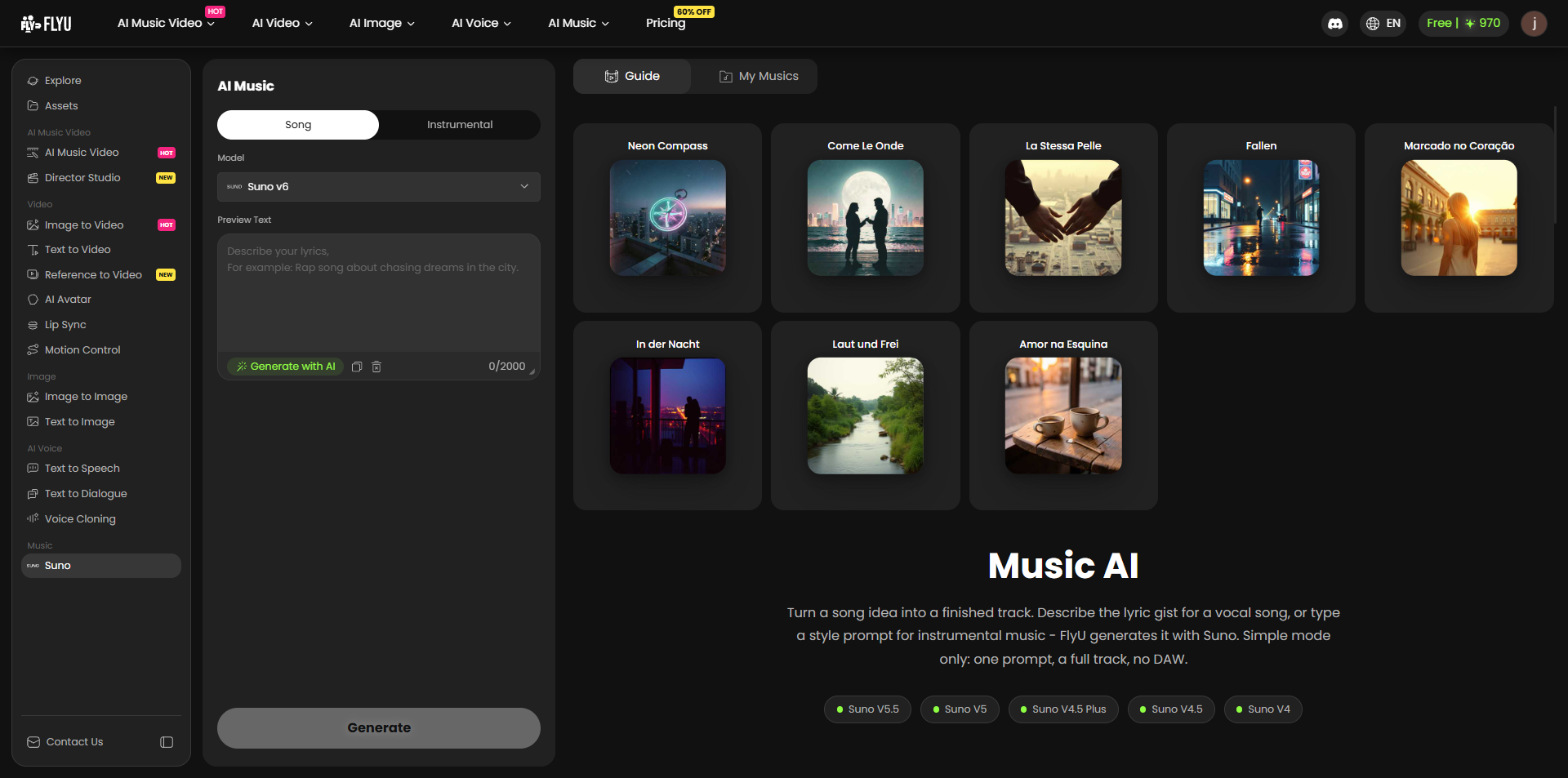
Upload a clean audio track (MP3, WAV, FLAC, or AAC). Use a 10–15 second hook clip if you're testing ideas in Lite Mode, or upload a full track up to 4 minutes in Pro Mode. Make sure your audio isn't heavily distorted so FlyU's audio analysis engine can clearly detect the beat and tempo. (Don't have a finished track yet? You can create a beat and vocals first using FlyU's built-in AI Music Generator powered by Suno v6.)
Step 2: Pick from 25+ Handcrafted AI Music Video Styles
Instead of writing complicated prompts, choose one of FlyU's 25+ AI Music Video Styles that fits your sub-genre:
- Urban Rumble — Gritty street visuals and concrete textures ideal for Boom Bap and underground rap.
- Midnight Gloss — Sleek, high-contrast lighting and luxury vibes for modern Trap.
- Cyberpunk Neon — Rain-slicked streets and futuristic neon reflections for Melodic Rap or Drill.
- Y2K Illusion & Retro-Future Synth — Throwback aesthetics with nostalgic color grading.
- Cinematic Drama & Digital Persona — Story-driven framing for conscious rap or animated virtual artists.
Step 3: Upload or Select Your Character for Lip-Sync & Concert Scenes
Upload a clear front-facing photo of yourself—or select an existing AI character—to lock in scene-to-scene character consistency.
- In Lip-Sync Mode (powered by Kling's digital human model), your character performs your bars with accurate mouth movements and natural head nods.
- In Pro Mode, you can switch between Story Mode (shot-by-shot narrative scenes) and Concert Mode (putting your rapper avatar on a high-energy stage synced to the music).
Mastering Audio-Visual Cadence: Dynamic 808 & Snare Beat Syncing
Most AI video tools treat music as background audio. They detect volume peaks and cut on the loudest moments. That produces edits that feel generic — technically on-beat, emotionally off.
Rap production doesn't work that way. The 808 slide, the hi-hat triplet roll, the snare placement — these are compositional choices that create the groove. A video that ignores them might as well be a lyric video.
Choosing the Right AI Video Model Inside FlyU
Using an AI video generator for rappers and hip-hop artists shouldn't lock you into a single look. In Pro Mode and Director Studio, FlyU lets you choose from leading video models based on the vibe of your track:
- Kick drum triggers scene cuts and camera moves — the hard cuts that land on the downbeat.
- Snare drives lyric overlay emphasis and character gesture peaks.
- Hi-hat rolls produce rapid cut sequences during triplet patterns, mimicking the editing language of professional rap videos.
- 808 slides create visual "slides" — motion blur transitions, color shifts, or camera pans that track the bass movement.
The result is an edit that feels like it was cut by someone who understands how rap is produced, not an algorithm reacting to decibels.
Combining performance lip-sync with urban cinematic storytelling
FlyU supports bar-level lyric synchronization: multi-syllabic rhyme highlighting, ad-lib animation, and flow-switch detection. When the rapper switches from double-time to half-time, the visual pacing adjusts. When a punchline lands, the system triggers an impact effect — color flash, freeze-frame, or shake — at the exact moment of delivery.
Ad-libs become visual elements. A "yeah" floats up from the frame corner. A "skrrt" streaks across the screen. Each ad-lib type has its own animation style, placed intelligently within the composition — never covering the main performer, always adding energy at the right moment.
This is what separates a rap music video from a slideshow. The visuals respond to the performance, not just the audio file.
Expanding Your Rap Aesthetic with Hip-Hop Specific Models
Generic AI video tools produce generic output. They can generate a face and sync lips, but they don't know the visual language of hip-hop: the streetwear textures, the specific camera angles that flatter a performer, the editing conventions that make a rap video feel authentic rather than AI-generated.
Choosing the Right AI Video Model in FlyU
FlyU's hip-hop generator uses six integrated AI models, each tuned for different visual aesthetics:
- Grok 1.5 — Raw, unfiltered street visuals with narrative depth. Ideal for Boom Bap and conscious rap.
- Sora 2 — Hollywood-grade cinematic quality. Use for the anthemic chorus or the high-budget-looking hook.
- Seedance 2.0 — Hyper-realistic motion for authentic performance scenes.
- Kling 3 — Complex group choreography. Perfect for posse cuts and crew videos.
- Veo3 — Fluid transition-heavy sequences for melodic rap.
- Gemini Omni — Creative, experimental blending of text and image inputs.
The model choice affects texture: fabric detail on a hoodie, the way light hits a chain, the grain of a concrete wall. These details are what make the difference between a video that looks AI-generated and one that looks like it was shot.
Exporting vertical teasers for TikTok & Reels versus widescreen YouTube versions
FlyU exports multiple formats from a single generation without re-rendering:
| Platform | Aspect Ratio | Resolution |
| TikTok / Reels / Shorts | 9:16 vertical | 1080x1920 |
| YouTube | 16:9 widescreen | 1920x1080 |
| Instagram Feed | 1:1 square | 1080x1080 |
| Spotify Canvas | 9:16 vertical | (1080x1920) |
Generate once, export everywhere. The vertical cut for TikTok uses the same beat-sync timeline as the widescreen YouTube version — the AI reframes the composition for each aspect ratio without losing the edit rhythm.
Final Checklist & Distribution Tips for Independent Artists
Before you generate:
- Master your audio. A clipped master produces random cuts.
- Choose one visual style and commit. Mixing aesthetics reads as inconsistent.
- Upload a reference photo if using a performer avatar. Face and outfit lock across every scene.
After you generate:
- Check character consistency across cuts. If the avatar drifts, regenerate with a stronger reference image.
- Verify beat sync at the drop. This is the emotional center — if it's off, the video loses its punch.
- Export 16:9 for the YouTube premiere and 9:16 for the feed promo. One generation covers every platform.
Copyright safety: The generated video is yours, as long as you hold the rights to the music. AI-generated visuals from FlyU are original outputs — not deepfakes or face-swaps. Confirm your track's licensing before commercial release.
Thumbnail strategy: Pull a frame from the punchline moment — the impact effect, the color flash, the freeze-frame. That frame is the hook that gets the click.
Streaming sync: Release the vertical teaser 48 hours before the track drops. The beat-synced cuts give listeners a reason to watch on mute, then turn the sound on. That's how the algorithm learns your track is worth pushing.
Ready to drop visuals for your next track without paying for a film crew? Head over to FlyU's AI Music Video Generator, upload your song and character photo, and create your first beat-synced rap music video in minutes.